The same app on every platform

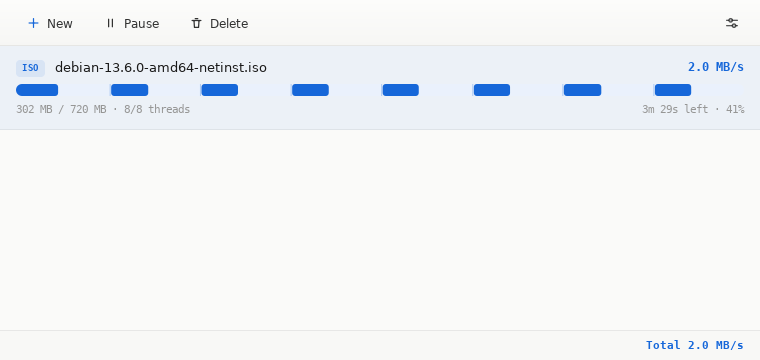
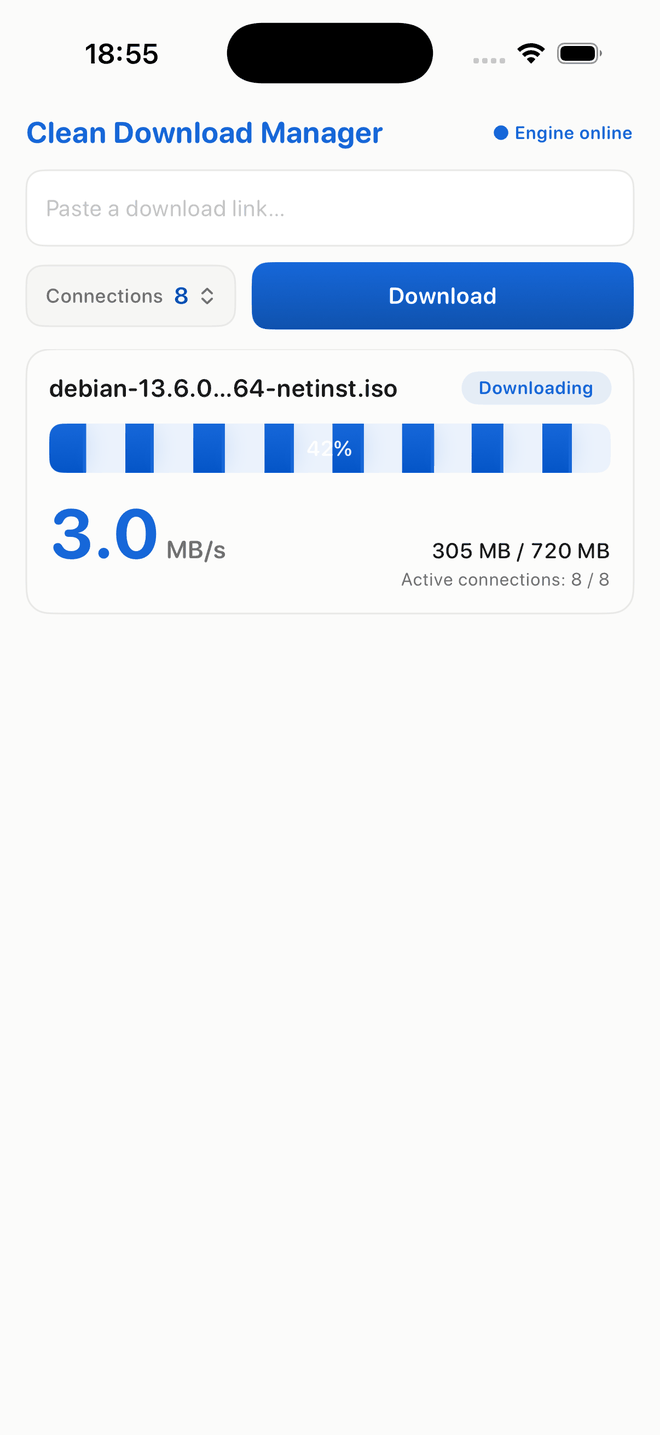
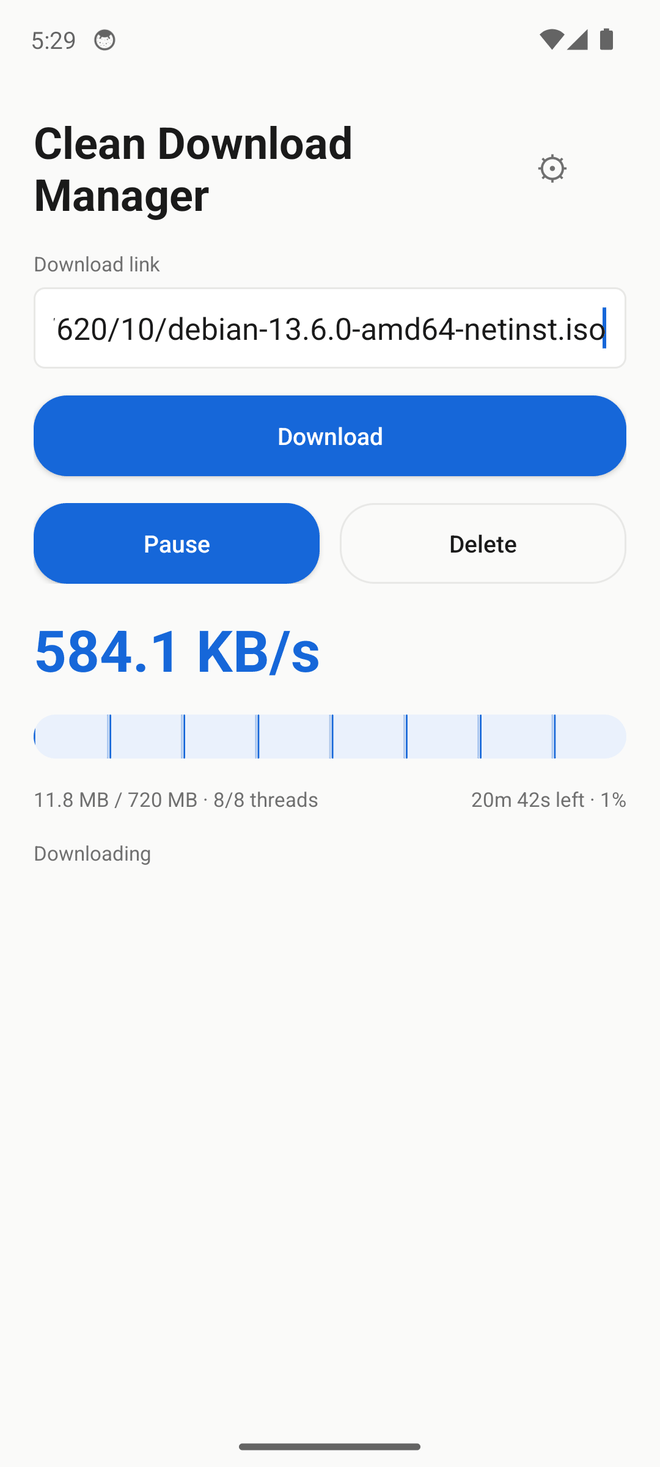
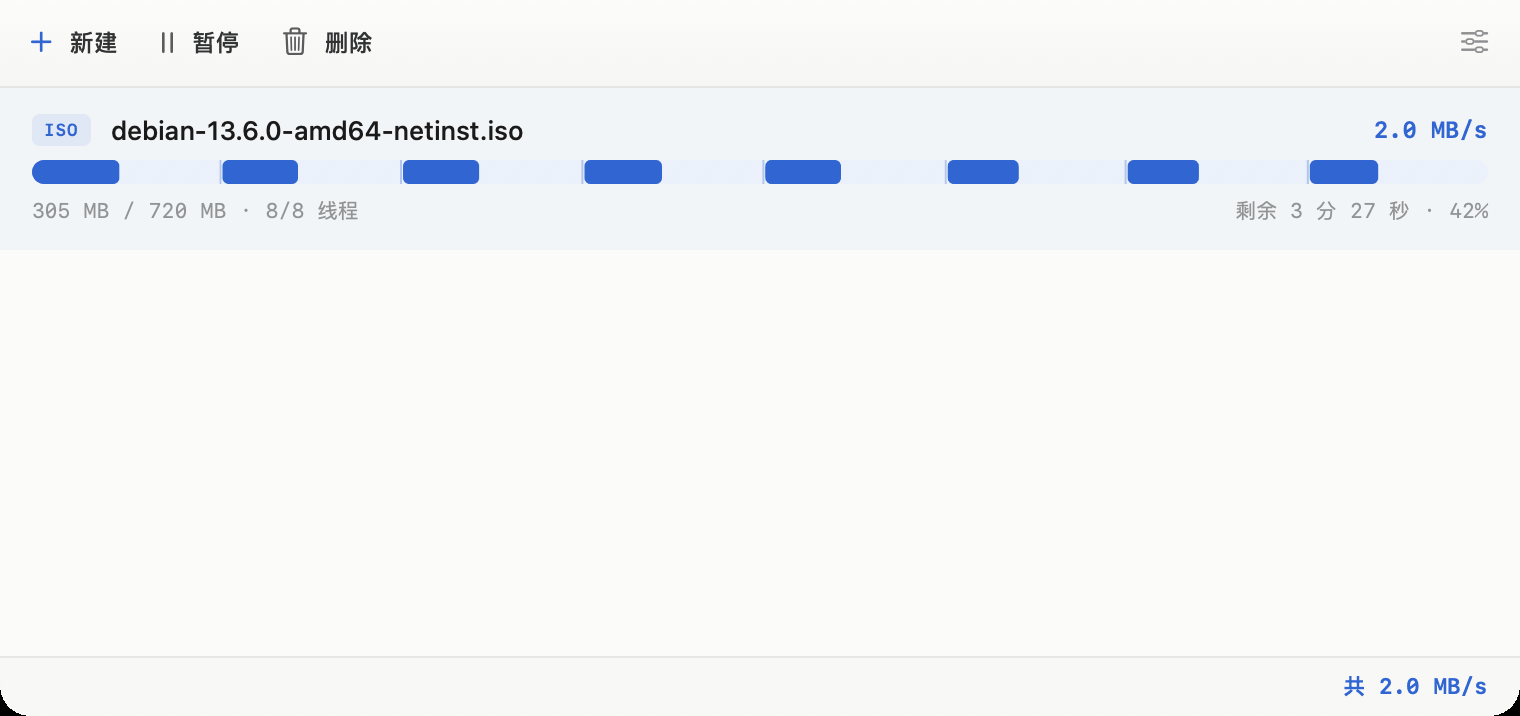
Real screenshots, not mock-ups. All five are the same 720 MB file over 8 threads; Windows, macOS, Linux and iOS were caught at the same moment.
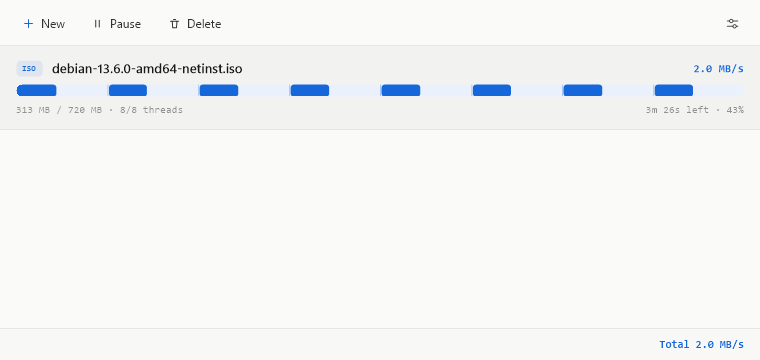
Clean Download Manager on Windows: one 720 MB file at 43%, 8 of 8 threads, 2.0 MB/s
Windows
Clean Download Manager on macOS: one 720 MB file at 42%, 8 of 8 threads, 2.0 MB/s
macOS
Clean Download Manager on Linux: one 720 MB file at 41%, 8 of 8 threads, 2.0 MB/s
Linux
Clean Download Manager on iOS: one 720 MB file at 42%, 8 of 8 threads, 3.0 MB/s
iOS / iPadOS
Clean Download Manager on Android: the same file downloading over 8 threads
Android

Measured, not marketing

Same speed as the heavyweights — a fraction of the resources. On a capped real-world link every downloader hits the same ceiling, so raw speed ties. Clean Download Manager's edge is what it costs your machine to get there — far less CPU and memory than Neat Download Manager, byte-correct at every connection count.

~68%less CPU time than Neat Download Manager
~86%less peak memory than Neat Download Manager
~95%smaller than Internet Download Manager's installer
End-to-end speed, 200 MB file
same harness, all three
Clean Download Manager
120.4 MB/s
Neat Download Manager
48.0 MB/s
Internet Download Manager
29.4 MB/s

One harness, one file size, every download SHA-256 verified — medians of 1492 / 1115 / 80 runs on 2026-07-14. This is end-to-end time, from starting a download to a finished byte-correct file, so it includes the per-download GUI and launch overhead that Internet Download Manager and Neat Download Manager pay and a headless CLI does not. It is not a raw-engine transfer-rate comparison: on a bandwidth-limited everyday connection all three converge, and the difference that remains is resource cost, footprint and IPv6 support. Caveats: the test VMs are disk-bound at roughly 72 to 79 MB/s write, and Neat Download Manager ran on a second identical VM because it crashes on the first one.

Metric Clean Download ManagerNeat Download ManagerInternet Download Manager
Everyday download speed 12 MB/s11.4 MB/s ~9 MB/s
End-to-end speed, 200 MB 120.4 MB/s48.0 MB/s 29.4 MB/s
CPU time per 148 MB (lower is better) 0.99 s3.13 s ~5 s
Peak memory (lower is better) 13 MB (2–3 MB on plain HTTP) 96 MB ~40 MB
Byte-correct at high concurrency every connection count ✓
Unattended automation native CLI, zero babysitting no CLI, GUI must be scripted CLI, but needs an external watchdog ~every 22
Platforms & connections Win macOS Linux Android, IPv4 + IPv6, ≤32 conns Windows macOS, IPv4 only, ≤32 conns Windows only, IPv4 only, ≤32 conns
Size (engine / app) Windows installer 606 KB, macOS .dmg 950 KB Windows setup 917 KB, macOS .dmg 1.47 MB Windows installer 12.49 MB
How these were measured. The CPU, memory and speed figures are a median-of-3 on the same 148 MB HTTPS file, reproducible. On an everyday IPv4 connection all three multi-connection managers land close together, so raw speed roughly ties — Clean Download Manager's clear wins are its smaller footprint, lower CPU and memory, and IPv6 support that older Internet Download Manager and Neat Download Manager builds lack. Internet Download Manager was measured on Windows: its CPU (~5 s) and memory (~40 MB) are higher than Clean Download Manager's and it is byte-correct; a directly comparable peak-throughput number wasn't collected, so its throughput cell is left blank rather than guessed. The automation row comes from a separate continuous cross-client loop of 2,600+ SHA-256-verified downloads on a Windows target: Clean Download Manager finished every one from a plain command line with no supervision; Internet Download Manager has a CLI, but an external watchdog had to restart it about every 22 downloads to keep it running; and Neat Download Manager has no command-line mode at all — it can only be automated by scripting its GUI, which needs an interactive desktop and is far more fragile than a real CLI. Package sizes are taken from the shipped artifacts.

Modern means smaller

A downloader shouldn't weigh more than the download. The only platform all three ship on, so it is the only honest comparison — measured, not rounded.

Clean Download Manager, Windows installer606 KB
Neat Download Manager, Windows installer896 KB
Internet Download Manager, Windows installer11.89 MB

One scale, three Windows installers, weighed on the same machine. Sizes are bytes÷1024 throughout, including the competitors': Neat Download Manager's installer is 917,340 bytes and Internet Download Manager's is 12,469,144. Clean Download Manager is 606 KB — smaller than Neat Download Manager, and a twentieth of Internet Download Manager.

Under the hood

How Clean Download Manager makes one file arrive faster. Reverse-engineered from the pro downloaders to match their segmented-download approach, on an all-new UI and cross-platform engine. On the same IPv4 path all three land close together; Clean Download Manager’s clear edge is its smaller footprint and IPv6 support that older Internet Download Manager and Neat Download Manager builds lack. The interactive view above mirrors what Clean Download Manager does internally.

01

Split into parallel fronts

Clean Download Manager opens multiple ranged connections to the same file, each one racing to fill its own slice of the byte range.

02

Steal idle work

The moment a connection finishes early, it re-splits the largest remaining slice — no connection sits idle while another lags.

03

Reassemble, byte-perfect

Positioned writes land each slice at its exact offset in a preallocated file. The result is checksum-identical to the source, every time.

Every platform

Get Clean Download Manager. Free, and every release ships Windows, macOS, Linux and Android on the same day. Pick your platform — every download is checksummed.

Windows

Windows 10 / 11 x64
FileCleanDownloadManager-0.1.416-windows-x64-setup.exe
Version0.1.416
Size606 KB
Updated2026-07-29
Download for Windows

macOS

macOS 13+ Apple Silicon & Intel
FileCleanDownloadManager-0.1.416-macos-universal.dmg
Version0.1.416
Size950 KB
Updated2026-07-29
Download for macOS

Linux

x86-64 & arm64 glibc 2.31+ .deb
Version0.1.416
.deb amd64533 KB
.deb arm64493 KB
Updated2026-07-29
Download for Linux, amd64
APT repository — installs, and keeps itself updated
curl -fsSL https://www.cleandownloadmanager.com/cdm-archive-keyring.gpg | sudo tee /usr/share/keyrings/cdm-archive-keyring.gpg >/dev/null echo "deb [signed-by=/usr/share/keyrings/cdm-archive-keyring.gpg] https://www.cleandownloadmanager.com/apt stable main" | sudo tee /etc/apt/sources.list.d/cdm.list sudo apt update && sudo apt install cdm
One-line install
curl -fsSL https://www.cleandownloadmanager.com/install.sh | sh

Android

Android 8.0+ arm64-v8a
FileCleanDownloadManager-0.1.416-android-arm64.apk
Version0.1.416
Size663 KB
Updated2026-07-29
Download APK

iOS/iPadOS

iOS 16+, sideload
FileCleanDownloadManager-0.1.416-ios-appstore.ipa
Version0.1.416
Size.ipa, 607 KB
Updated2026-07-29

Signed for the App Store, so it is not tap-to-install — it is what AltStore and Sideloadly take to re-sign with your own Apple ID. App Store review is in progress.

Download IPA

HarmonyOS

HarmonyOS NEXT, sideload
FileCleanDownloadManager-0.1.416-harmonyos-arm64-unsigned.hap
Version0.1.416
Size661 KB
Updated2026-07-29

Unsigned, which is what the sideload installers expect — they fetch a debug certificate and sign it on your device. Not in AppGallery yet.

Download HAP

Browser extension

Chrome, Edge, Firefox
FileCleanDownloadManager-0.1.416-chrome-extension.zip / …-firefox-extension.zip
Version0.1.416
Size.zip, 44 KB
Updated2026-07-28
Get the extension

Privacy

What Clean Download Manager collects. Short version: no accounts, no advertising, no third-party analytics and no cross-site tracking — the only records are the ordinary web-server log described below. This page states exactly what leaves your machine, because the browser extension asks for permissions that sound alarming and you deserve to know why.

The app

Downloads happen entirely on your machine. File names, addresses and contents are never sent anywhere.

Two things do leave, both optional and both anonymous. The update check asks the website which version is current and carries a random identifier generated on first run, plus your platform and version — it is not derived from your hardware or any account, and reinstalling produces a new one. It exists so we can count installs rather than IP addresses. Turn off “Check for updates automatically” in Settings and it stops entirely.

The second is a diagnostic report, sent only if you tap Share on the banner the app shows after a crash or an abnormal resource reading. It contains numbers only: version, OS, uptime, memory, CPU and task counts.

What the website keeps: for each request, the time, the path or file, the response status, and what Cloudflare derives at the edge — country, region, city, data centre and network operator — plus the browser's user-agent, referring page, language header and IP address. Rows are pruned after about 400 days. It is a first-party count of what is downloaded from where; it is not sold, shared, or joined to anything else, and there is no third-party analytics, ad network or cross-site identifier anywhere on this site.

The browser extension

The extension talks to one address: the engine running on your own computer, at 127.0.0.1. Nothing it reads is sent to us or to anyone else.

It asks for broad permissions because a download manager cannot work without them, and here is the specific reason for each:

The website

Visits are counted with our own first-party analytics — no third-party service, no advertising network, no cross-site identifiers, and no cookies for tracking.

Contact

Questions about any of this: support@cleandownloadmanager.com

Last updated 2026-07-28.

What's changed

Clean Download Manager is in technical preview, built continuously. Below are the milestone releases shipped on every platform. Every release ships Windows, macOS, Linux and Android together.

v0.1.4162026-07-29Current

A download that slowed down for a moment no longer runs the rest of the file at that speed

  • Fixed: when adding connections stopped helping, the download stopped trying for the rest of the file — even though “not helping” is only ever true of that moment. A competing download, a video call or a congested hop makes two measurements look flat, and nothing was watching for it to clear. The engine now retries after a pause, doubling the wait each time so a source that genuinely does not benefit is left alone. A server that has answered “too many connections” is still never retried — that protection is unchanged.
  • On the site: the overview page shows the five clients one platform at a time, at a size where the filenames and thread counts are readable, and the phone screenshots are whole screens rather than crops.
  • The footer now carries a copyright line, and every size stated anywhere on the site is generated from the release manifest instead of typed in — after the last release the pages still quoted the previous version’s figures in both languages.
v0.1.3962026-07-29

Redirecting sources stop paying for the redirect on every segment, and the Windows Settings panel fits on a small screen

  • Fixed: on any source that redirects — which is most CDNs — every segment re-walked the whole redirect from the original address, so the DNS lookup, the TCP connection and the TLS handshake were paid again per segment and the connection could never be reused. Segments now request the address the redirect resolved to, and fall back to the original if that address stops working, which is what an expiring signed URL looks like.
  • Fixed: on a small screen the Windows Settings panel was taller than the desktop, putting Save and Cancel below the bottom edge with no way to reach them. The panel is now capped to the monitor's work area and scrolls, the same way the Linux one already did.
  • Fixed: a download's connection count could be measured during connection setup and mistaken for its steady speed, so the ramp stopped early. The first window is no longer used as the baseline.
  • On the site: the overview page now shows real screenshots of five clients — Windows, macOS, Linux, iOS and Android — all downloading the same 720 MB file over 8 threads, and the Linux install commands have a copy button.
v0.1.3262026-07-28

The browser extension has a home, and downloads stop settling for half the connections they were given

  • Settings now lists each browser separately — Chrome, Edge, Firefox, and Safari on macOS — and says whether that browser's extension has actually reached the app, rather than merely whether the browser is installed. A browser you do not have is greyed out.
  • Fixed: a download could switch off its own connection ramp within the first three seconds and stay there for the whole file, having never been rate-limited. The first measurement window spans connection setup, and on a source that opens fast and then settles it reads about double the real speed; that number was then treated as the bar to beat. Measured on one such link, a download held 10 of its 16 connections before, and reaches all 16 now.
  • The extension packages are published with the release, and there is a page explaining how to install them today — including the parts browsers make awkward, since neither store listing is live yet.
  • Fixed: the Windows toolbar's Pause button read “Show main window”, Delete read “Technical Preview”, and Settings showed the product blurb. The string table had drifted out of order against the enum that indexes it; a check now runs over both Windows and Linux.
v0.1.3112026-07-28

The Android app is a third of its old size, and the progress bar stops hiding connections

  • The Android download is now 655 KB, down from 2.07 MB. Its interface was rebuilt without Jetpack Compose, and without the other four frameworks it dragged in; nothing about the app changed except its weight.
  • The segmented progress bar used to show only the first compartment during the first seconds of a download, even with eight connections running. Every connection with real progress is now visible immediately, on all four platforms.
  • The download speed reads to one decimal again, with the number moving continuously rather than stepping ten times a second.
  • On the site: the macOS window shown on the features page is now drawn from an actual screenshot — including the status bar it had been missing entirely — and the time-remaining text there follows the same units as the app, in both languages.
v0.1.2782026-07-26Features

A new icon, real file names, a right-click menu, and a Windows installer

  • Downloads now take their real name from the server instead of whatever the link ended in, so an address like download.php?id=… no longer saves a file called "download.php".
  • Right-click any finished download for Open, Show in Folder and Copy Link. On Android, long-press.
  • New download no longer starts with a sample address pre-filled; if the clipboard holds a link, that is offered instead — the same thing Internet Download Manager and Neat Download Manager do.
  • Windows now ships a proper installer, and the program is named in full rather than as an abbreviation.
  • Settings was rebuilt: launch at login, a proxy that is off unless you turn it on, download threads defaulting to 8, and the diagnostic prompt moved out of Settings — the app now offers it only when it has actually detected a crash, which it reads from the system's own crash report rather than guessing.
  • A new app icon across every platform, finished downloads show when they finished, and a very long time-remaining now reads in days, months or years instead of tens of thousands of hours.
  • Known issue: on the command line, re-running an interrupted download of a file whose name the server supplies starts it over instead of resuming. Pause and resume inside the app are unaffected. A fix is in progress.
v0.1.2742026-07-26Fixes

Time remaining is now readable at any length

  • A very long download used to report its time remaining in hours and nothing larger, so a slow transfer could read "1727696 hours". It now steps up through days, months and years — "5d 4h", "2mo 12d", "3y 5mo" — on every platform and in both languages.
  • Both competitors were checked first: neither escalates past hours. Neat Download Manager displays a genuine "343325 hour 25 min 39 sec" for a multi-year estimate, and Internet Download Manager reports seven days as "168 hour(s) 0 min" and blanks the cell entirely past 10000 hours.
  • The six places that format a duration — the three desktop apps, iOS, the command line and the engine's built-in web page — had drifted apart in units, spacing and dash characters, and two of them could overflow on very large values. They now produce byte-identical output for every input.
v0.1.2712026-07-26Fixes

The progress bar now shows every connection, and the thread count shows what is actually running

  • The segmented progress bar now draws a divider at every real connection boundary, on all four platforms. A segment used to become visible only once it had downloaded enough to render, so a 32-connection download looked like a handful of scattered blocks: on Windows and Linux a compartment needed roughly 21 MB before it appeared at all, and on Android the segments merged into one solid bar so the split was never visible.
  • The connection count now reads live / maximum instead of the number set in Settings. A source that does not support resuming runs on a single connection, and a rate-limited host makes the engine settle on fewer — the row now says so rather than always showing the configured maximum.
  • A stalled transfer no longer shows an absurd time remaining next to a zero speed; it shows a dash. The percentage is consistent across platforms and no longer rounds up to 100% before the file is finished.
  • The status bar no longer counts queued downloads as active ones, so it agrees with the list above it.
v0.1.2642026-07-26Fixes

Faster on slow links, a speed readout matched to the millisecond, and fixes for two ways the app could get stuck

  • Fixed a real problem on slow or rate-limited sources: the engine mistook "this server is simply slow" for "we are overloading it" and kept dropping connections until barely any were left, so speed sputtered and stalled. It now widens its measurement window on slow links instead of guessing, and climbs back to your full connection count.
  • The speed readout was rebuilt against frame-by-frame measurements of a competitor rather than guesswork, so the number moves the way a download actually feels instead of sitting still between updates.
  • Fixed a bug that could lock the whole window: opening New Download from the menu bar while the sheet was already open left a dead panel that only a force-quit could clear. Cancelling a sheet also used to disable the New button for the rest of the session.
  • Minimizing or hiding the window now actually saves power (it was still redrawing at full frame rate behind your other windows), and quitting during a download now finishes writing progress to disk before exiting, so resume never loses the last few hundred KB.
  • Android no longer leaves a permanent "engine running" notification after the first download.
v0.1.2482026-07-25Fixes

Idle energy fix (from a real user's report) and opt-in diagnostics

  • Fixed the idle battery drain a user reported against v0.1.139 (the app topping Activity Monitor's energy list while doing nothing): rendering and engine polling now wind down to one wakeup per second — and on macOS stop entirely — when nothing is transferring. Measured idle CPU fell from about 6% of a core to 0.5%, and macOS App Nap can finally engage. Download smoothness is unchanged: full vsync rendering resumes the moment a transfer runs.
  • Memory was audited and measured at the same time: no leak — RAM stays flat at idle, plateaus during long transfers, and transfer peaks are promptly reclaimed. The v0.1.139 symptom was constant CPU wakeups, not growing memory.
  • Android additionally suspends polling completely while the app is in the background (it used to keep polling at 10 Hz).
  • New, macOS first: if the app's own resource usage ever looks abnormal, it asks once — in a small in-window banner, never a popup — whether to share a single anonymous diagnostic (numbers only: version, OS, uptime, RAM, CPU, task counts). Nothing is sent unless you click Share, and Settings has a switch to stop it asking at all.
v0.1.2412026-07-23Engine

Faster ramp-up, FTP & WebDAV, and smaller Windows & macOS packages

  • Adaptive connections now ramp up exponentially: full 32-connection speed in about 6 seconds instead of 22 on a clean server, with the 429 back-off and convergence protections unchanged.
  • New protocols: FTP downloads (multi-connection, resumable) and WebDAV, plus support for user:password credentials in URLs (kept strictly to the same origin).
  • Windows portable download drops from 1.16 MB to 0.59 MB — the old zip shipped a second copy of the engine that the GUI already embeds; the command-line build now ships as its own zip.
  • macOS disk image shrinks from 1.49 MB to 0.87 MB with LZMA compression, still one universal build for Apple Silicon and Intel.
  • The in-app update check now knows its own version correctly on Windows and Linux — new builds no longer offer themselves as an "update".
v0.1.1762026-07-18Fixes

Working pause & delete, auto-update, and real-user analytics

  • Pause, resume and delete now work end-to-end on every platform (runtime-verified). Delete removes the row, a canceled download no longer lingers as a stuck entry, and the pause button relabels to Resume.
  • Added a launch update check with a dismissable in-app banner, plus a Settings toggle to turn it off.
  • New Windows installer (install / uninstall) alongside the portable build.
  • Android gained pause / resume / delete controls for the active download.
  • Fixed dialog layout issues: off-screen Settings/New windows and resize artifacts on Windows, and safe-area / scroll handling on Android.
v0.1.1602026-07-18Fixes

Stability overhaul + a smaller build

  • About 73 issues fixed across 11 rounds of cross-checked Codex + Claude security audits — cross-platform correctness, security hardening, Windows Unicode (Chinese) paths, and memory bounds.
  • Fixed a regression where pausing a download could lose its progress.
  • Fixed a crash when opening the file picker on macOS.
  • Windows installer trimmed further — the portable .zip is down from 1.67 MB to 1.15 MB.
v0.1.1392026-07-18Fixes

Unified design across platforms + Windows HTTPS fix

  • New app icon and an identical, cleaned-up window layout across Windows, macOS and Linux — one toolbar, one task list, one status bar.
  • Fixed a Windows-only bug that stopped secure (HTTPS / TLS 1.3) downloads from starting — HTTPS links now download on Windows just like on macOS.
  • The New download window now lets you choose the save folder; connection count moved to global Settings (default 16).
  • Website rebuilt; every platform's installer rebuilt and re-verified at this version.
v0.1.130–v0.1.1382026-07-17Design

Redesigned desktop interface

  • A single clean window replaces the old two-pane manager: toolbar, task list with the live segmented progress bar, and a status bar — nothing else.
  • New rounded-arrow app icon shared across every platform.
Engine 2026-07-142026-07-14Engine

Steadier speed on real-world servers

  • Adaptive connections: the engine adds connections when they help and backs off when a server rate-limits, ending the speed swinging between fast and slow on throttling servers.
  • HTTP keep-alive connection reuse — far fewer reconnects, so the speed holds instead of dipping between segments.
  • Byte-perfect resume: every segment is checkpointed to disk, so an interrupted download picks up exactly where it left off, verified byte-for-byte.
Engine 2026-072026-07Engine

A smaller engine with adaptive connections

  • The download engine was trimmed by about 40% — the arm64 build is 577 KB.
  • Adaptive connection scaling can improve large-file throughput without forcing a fixed connection count.
Preview2026-07Launch

First public technical preview

  • One C++ engine across Windows, macOS, Linux and Android — arm64 and x86-64 — built and shipped together, with self-contained desktop apps under 2 MB.
  • Multi-connection acceleration, browser video capture, and no ads, accounts or telemetry.

Version numbers increment continuously during the preview, so builds between these milestones exist too. Auto-update inside the app always points to the newest build.